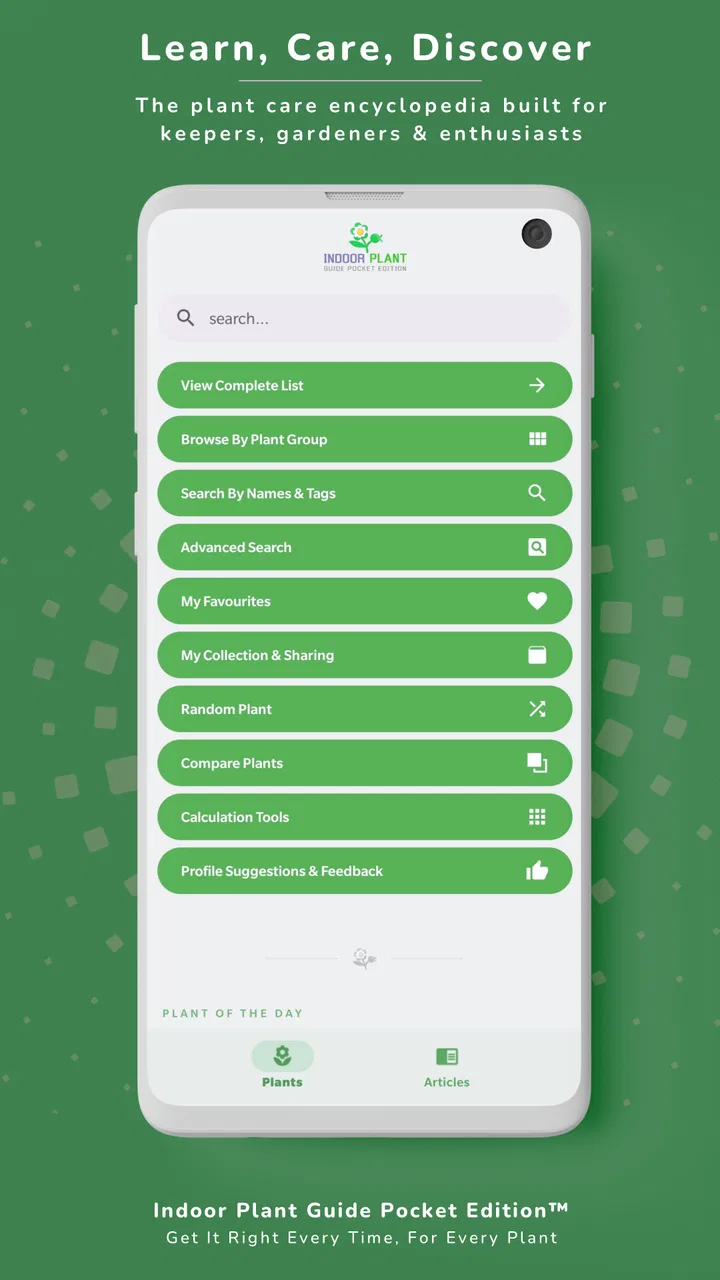
Indoor Plant Guide Pocket Ed.
- 4.6
- Rating
- 10.00K
- Installs
- $2.99
- Price

 Analysis by App-foxy
I approached Indoor Plant Guide Pocket Ed. as the sort of practical companion I would keep nearby while caring for plants at home, rather than as a decorative encyclopedia. Its purpose is straightforward: help me make better day-to-day decisions for houseplants, indoor plants, garden plants, and flowers. That focus matters because plant care often goes wrong in ordinary moments—when a leaf starts turning yellow, a pot feels dry, or I cannot remember whether a particular plant prefers bright light or a gentler position.
Developed by M.Stevens, this paid House & Home app costs $2.99 and is aimed at everyone, not only experienced gardeners. I found that positioning sensible. It is most useful when I want guidance that is easier to consult than a stack of books or scattered web pages, while still being more focused than a general gardening app. Its current version is 4.17, and it runs on Android 6.0 or later, so the technical entry point is reasonably broad for people using older compatible devices.
The app has built a modest but convincing audience, with over 10 thousand installs and a 4.6 average from around 189 ratings. Those figures do not replace personal testing, but they suggest that the simple idea has found people who prefer a dedicated plant-care reference. After spending time considering how it fits into real routines, I see it as a useful tool for reducing guesswork—not as a substitute for observing the plant itself.
You May Also Like

 AccuWeather: Weather Radar
AccuWeather Review: A Quick, Clear Forecast for Everyday Decisions
For everyday plans, the best forecast is the one you can understand quickly. AccuWeather makes rain timing, radar, and local conditions easy to act on, with a few trade-offs.

 Hill Climb Racing
Why Hill Climb Racing Still Turns Crashes Into One More Run
A tiny car, a bumpy hill and one more upgrade: Hill Climb Racing keeps resurfacing because its simple chaos makes every near-miss feel personal.

 AliExpress - Shopping App
AliExpress Makes Global Shopping Feel Personal, but Shoppers Bear the Risk
AliExpress turns a global marketplace into a pocket-sized discovery engine. Its reach is useful, its shopping loop compelling, and its trade-offs easy to miss.

 Lords Mobile: Kingdom Wars
Lords Mobile Is a Kingdom-Building Routine, Not a Quick Match
A case-by-case verdict on the building, battles, device demands, and social commitments that make Lords Mobile rewarding for some players and exhausting for others.

 PDF Scanner app - TapScanner
TapScanner Makes Paperwork Easier to Capture, Check, and Share
TapScanner makes scanning with a phone feel less like a rescue operation and more like a dependable step in getting work done. Its capture tools are useful, though not flawless.

 Block Blast!
 Shows How Much a Puzzle Game Can Leave Out
A quiet grid game shows why puzzle players increasingly value instant clarity, repeatable skill and low-pressure play—and where the genre still needs to catch up.
More From Our News Desk
View All News


How the guide fits into everyday plant care
I find a shared plant-care routine works best when everyone checks the same basic guidance before taking action. This section looks at how a focused reference can help household members make more consistent choices, while keeping the plant’s actual condition—not a simple rule—in charge. That distinction leads naturally to the practical question of how to use a guide without assuming every person or device in a home has the same setup.
A focused reference instead of a general gardening feed
The strongest part of the experience is its narrow purpose. Many gardening alternatives mix plant identification, social posts, seasonal articles, shopping suggestions, and reminders into one busy package. That can be helpful when I want inspiration, but it can also slow me down when I have a specific care question. This guide is better suited to the moment when I already know which plant I am dealing with and want to check how to look after it.
That distinction makes it particularly approachable for someone who has recently bought a few indoor plants and is unsure how much attention they need. A beginner can use a care entry as a starting point, then compare the guidance with the conditions at home. I would not treat a written recommendation as an automatic watering command, because a plant in a bright, warm room may dry out differently from the same plant in a cool corner. The app helps establish a baseline; my own observation still decides what happens next.
I also like that the scope is not limited to fashionable houseplants. The inclusion of garden plants and flowers gives the guide a wider role for people whose interests move between a windowsill collection, patio containers, and outdoor beds. That breadth is valuable, although it also means users should pay attention to context. Indoor and outdoor conditions are not interchangeable, and a general care note needs to be interpreted alongside season, soil, pot size, and local weather.
What I would do with it during a normal week
Imagine I notice that the lower leaves of a plant have begun to lose their color. Instead of immediately adding water, I would open the relevant guide, review the basic care needs, and then inspect the soil, drainage, light exposure, and nearby temperature. That workflow is more useful than blindly following a fixed schedule. If the soil is already wet, watering again could make the original problem worse, even if the plant is commonly described as thirsty.
For a new plant, I would use the app before choosing its permanent position. I would check the care information, place the plant where its light needs are most likely to be met, and then watch how it responds over several days. This is one of the less obvious ways to get value from a reference app: use it before problems appear, not only after a leaf has already changed.
It can also help when several plants have different routines. Rather than treating a collection as one group, I can consult each entry and make a small handwritten or phone-based note about which plants need closer observation. The guide itself does not remove the need for a routine, but it makes that routine more informed. I find that especially helpful for people who buy plants impulsively and later discover that their care requirements vary considerably.
Useful for beginners, still relevant to careful owners
New plant owners are the clearest audience. The language and purpose are less intimidating than a specialist horticulture reference, and the Everyone age rating makes it suitable for households where younger family members are learning to care for plants. A child can use it alongside an adult to understand why a plant should not be watered every time it looks slightly limp, while an adult can turn the guidance into a simple observation exercise.
More experienced growers may still appreciate the convenience, but they should have realistic expectations. Someone who already keeps detailed records, understands soil mixes, and knows how to diagnose pests may find a broad guide too basic for difficult cases. It is better at supporting everyday care than at replacing specialist knowledge. For me, that is not a serious flaw; it simply defines the app’s proper place.
The paid price also changes the decision. At $2.99, it is inexpensive compared with buying a physical reference book, but it is not the right choice for someone who only owns one hardy plant and rarely needs advice. A free web search may be enough for occasional questions. The purchase makes more sense when I want a dedicated reference that I can return to repeatedly without turning every small care decision into a new search.
How it compares with common alternatives
Compared with a general search engine, the guide offers a more deliberate starting point. Search results can provide excellent information, but they also bring conflicting advice, commercial pages, outdated posts, and recommendations written for conditions very different from my own. A focused plant guide reduces that noise. The trade-off is that a search engine can go much deeper when I need help identifying an unusual disease, comparing specialist treatments, or reading advice from a particular growing region.
Compared with a plant-identification app, this guide serves a different stage of the process. Identification tools are useful when I do not know what I have. Once the plant is identified, a care reference is more relevant for deciding where to place it and how to monitor it. If my main problem is naming an unknown plant from a photograph, I would choose an identification-focused alternative first. If I already know the names of my plants, Indoor Plant Guide Pocket Ed. is the more direct companion.
It also differs from reminder-based plant apps. A reminder can tell me that an action is due, but a fixed notification may encourage automatic watering even when the soil is still damp. This guide is better used as a decision aid than as a rigid calendar. That is an important trade-off: it requires me to pay attention, but it avoids pretending that every plant follows the same timetable.
Small habits that make the reference more useful
My first practical tip is to consult the guide when buying a plant, before I bring it home. That gives me a chance to think about whether my available light and space are realistic. A plant can be attractive in a shop and still be a poor match for a dark room or a household that travels frequently.
My second tip is to check the care information alongside the physical pot. Drainage, soil moisture, and container size can change how the written advice applies. If a plant is in a decorative container with nowhere for excess water to escape, the correct response to a dry-looking surface may not be as simple as adding more water. The app cannot inspect the container, so I need to use its guidance with that detail in mind.
My third tip is to use it for comparison rather than memorization. When two plants sit in the same room, I can look at their care needs and decide whether they should really share a watering routine. This prevents one of the most common household mistakes: caring for every plant according to the needs of the easiest one. A small collection becomes much easier to manage when I group plants by similar conditions instead of by appearance.
A fourth useful habit is to review the guide after moving a plant. Changes in light and temperature can affect how quickly soil dries and how a plant behaves. I would not assume that a routine that worked on a bright windowsill will remain suitable after the plant is moved farther into the room. Using the reference again after a change of location keeps the advice connected to the new situation.
What the current version means for existing users
Version 4.17 is the current point of reference for anyone deciding whether to install the app now. The version number shows that the product has moved beyond its earliest release rather than remaining at its original starting point. It first appeared on March 22, 2019, so its continued presence gives the impression of an established utility rather than a brand-new experiment.
I would be careful, however, not to turn the version number into a promise of a particular feature or redesign. A higher version does not automatically mean that every user will notice a major change. For someone already comfortable with the app, the most important question is whether the existing care-reference workflow remains convenient and trustworthy enough to keep using. For a new user, the current version is the one that matters, because it represents the present experience rather than the app’s early form.
The long-running nature of the product is helpful in one practical sense: it makes the app feel suited to repeated seasonal use. Plant care is not a one-week project. I can return to the guide when bringing plants indoors, starting outdoor flowers, changing positions, or checking a plant after a period of neglect. That recurring usefulness is a better reason to buy it than the novelty of installing another app.
Where I still felt some friction
The main limitation is the unavoidable gap between general guidance and a specific home environment. A care guide can explain what a plant usually prefers, but it cannot see whether my room has dry air, whether a window receives harsh afternoon sun, or whether I have accidentally compacted the soil. I still need to diagnose the situation rather than follow instructions mechanically.
I would also hesitate to rely on it alone for urgent or advanced problems. Severe pest infestations, root damage, fungal issues, and confusing symptoms often require close examination and more specialized information. In those cases, photographs, local gardening advice, or a specialist reference may provide better help. The app is a sensible first stop, but not necessarily the final authority.
Another consideration is the paid model. Some users prefer free apps supported by advertising or optional purchases, while others would rather pay once for a focused tool. The $2.99 cost is easy to justify for regular plant owners, but casual users may not open it often enough to feel the value. I would decide based on how many plants I care for and how frequently I want a dedicated reference, not simply on the low price.
There is also a difference between wanting knowledge and wanting automation. If I expect automatic schedules, a collection dashboard, or a system that manages every plant without my involvement, this may not be the best match. Its value comes from helping me make better observations and choices. People who want a highly automated household plant manager should compare it with tools built around reminders and tracking.
Who should install it and who should skip it
I would recommend it to a beginner with several houseplants, a renter trying to keep greenery healthy in changing rooms, or a gardener who wants one compact reference for both indoor and outdoor plants. It is also a good fit for someone who dislikes sorting through contradictory online advice and would rather begin with a purpose-built guide.
I would be less enthusiastic for an advanced grower who needs detailed troubleshooting, highly specific regional advice, or a complete plant journal. I would also skip it if I only wanted plant identification, because a care guide cannot replace an identification tool when the plant’s name is unknown. Finally, anyone who dislikes paid apps on principle may prefer a free alternative, even if that means accepting more searching and less focus.
What I would watch as the app continues
For future development, I would pay attention to how well the guide keeps its information useful across changing indoor conditions and different types of outdoor plants. The best direction would be to add practical context without making the app feel crowded: clearer ways to distinguish routine care from troubleshooting, guidance that encourages checking soil and light, and improvements that make repeated reference faster.
I would also value changes that respect the app’s current strength rather than turning it into a noisy social platform. Its appeal lies in being a calm, focused tool. More features would only help if they made plant decisions clearer. If development moves toward excessive notifications, shopping prompts, or generic content, it could lose the simplicity that makes it attractive in the first place.
My overall view is positive but measured. Indoor Plant Guide Pocket Ed. does not eliminate the need to look closely at a plant, and it is not a specialist diagnostic service. What it does offer is a practical foundation for everyday care across houseplants, indoor plants, garden plants, and flowers. I would recommend it to someone who wants a compact reference and is willing to combine its advice with common sense. Its real strength is helping me replace impulsive plant care with a more observant routine.
FAQs for Indoor Plant Guide Pocket Ed.
01What is Indoor Plant Guide Pocket Ed.?
Indoor Plant Guide Pocket Ed. is a reference app designed to help users identify and care for common houseplants. It typically provides information about lighting, watering, soil, temperature, feeding, and general maintenance. The pocket-style format makes it useful for beginners who want quick care advice without searching through multiple websites or carrying a printed plant guide.
02Is Indoor Plant Guide Pocket Ed. suitable for beginners?
Yes, the app is aimed largely at people who are new to indoor gardening. Its plant profiles and care recommendations can help explain basic concepts such as indirect light, watering frequency, humidity, and drainage. However, users should remember that every home has different conditions, so the suggested routines should be treated as a starting point rather than a strict schedule.
03Can the app identify an unknown plant from a photo?
Indoor Plant Guide Pocket Ed. should not automatically be assumed to include camera-based plant recognition. A pocket guide generally works by allowing users to browse plant entries and compare descriptions or images. If you need instant identification from a photograph, check the current app listing and permissions before downloading, because that feature may not be available in every version.
04Does Indoor Plant Guide Pocket Ed. work without an internet connection?
Offline access depends on how the app stores its plant profiles, images, and other content. Many pocket reference apps are intended to provide at least part of their information without a constant connection, but online requirements can change after updates. Before relying on it while shopping for plants or traveling, open several sections in airplane mode and confirm that the information remains accessible.
05Is Indoor Plant Guide Pocket Ed. a replacement for professional plant advice?
No. The app is best used as a convenient educational reference for everyday indoor plant care, not as a substitute for a horticulturist or plant-health specialist. Symptoms such as persistent yellowing, root rot, pests, fungal infections, or toxicity concerns may require more detailed diagnosis. Always verify advice for unusual species and keep potentially poisonous plants away from children and pets.
Pros
- Works offline
- making plant care advice available without a constant connection.
- Compact reference format is convenient for quick checks while caring for plants.
- Useful for beginners who need simple guidance on common indoor plant needs.
- Can help organize basic care routines for watering
- light
- and placement.
- Lightweight app should take up little storage space on most devices.
Cons
- Plant coverage may be limited compared with larger plant-identification apps.
- Care advice may not account for every home’s climate or indoor conditions.
- No guarantee that all recommendations reflect the latest horticultural research.
- Users may still need a separate app to identify unknown plants from photos.
- Some features or content may feel basic for experienced plant owners.

Indoor Plant Guide Pocket Ed.
Gallery